
Offline Player: Local Music
SUPER MM LtdMusic & Audio
4.5137.00 Reviews
- Version
- 1.0.2
- Installs
- 500.00K
- Age Rating
- Everyone
Screenshots

Our Review of Offline Player: Local Music
 Analysis by Appyee
I like music apps that understand one simple situation: sometimes I already own the songs I want to hear, and I do not need another streaming subscription to play them. Offline Player: Local Music is built around that idea. It is a free Music & Audio app from SUPER MM Ltd that focuses on listening to music stored on your device, rather than sending you toward an online catalog.
That narrow purpose is also the reason to consider it carefully. This is not the kind of player I would choose when I want recommendations, artist discovery, shared playlists, or a huge cloud library. I would look at it when my starting point is a collection of audio files already available locally and my desired outcome is straightforward playback without mobile data or Wi-Fi. In my experience, that makes the app most interesting for commutes, flights, weak-signal areas, downloaded recordings, and anyone who wants a simpler alternative to a streaming-first music routine.
From stored files to everyday listening
I find the useful question here is not just whether my songs play, but how smoothly a prepared collection fits into the small gaps of an ordinary day. I would use this section to consider the handoffs between stored files and listening, then look at what happens when that routine meets unreliable coverage, busy use, or a phone with limited room.
The right starting point: music you already have
The first question is not whether the app has enough songs. It is whether your music is already on the phone. The store summary clearly positions Offline Player: Local Music as a local playback tool, so I would begin by checking the device itself: albums copied from a computer, legally downloaded tracks, personal recordings, or other audio files that I want available without an internet connection.
This distinction matters because a local player and a streaming service solve different problems. A streaming service begins with an online catalog and usually becomes useful before you have any files prepared. This app begins with your own storage. If your library is empty, disorganized, or mostly dependent on online access, the first part of the experience is not pressing play; it is getting the audio onto the device and making sure the files are easy to recognize.
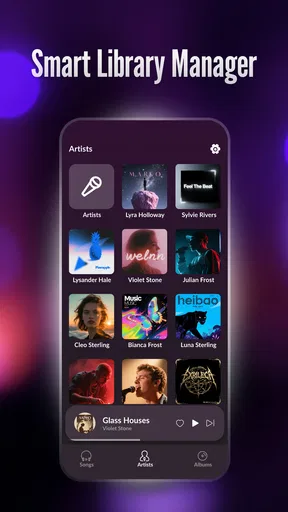
That gives me one practical recommendation: organize the collection before expecting the player to feel effortless. Clear artist, album, and track information should make browsing easier than a folder full of vague filenames. If the files are messy, the app may still be useful as a playback destination, but the responsibility for a clean library starts before the app is opened.
What the first session is really about
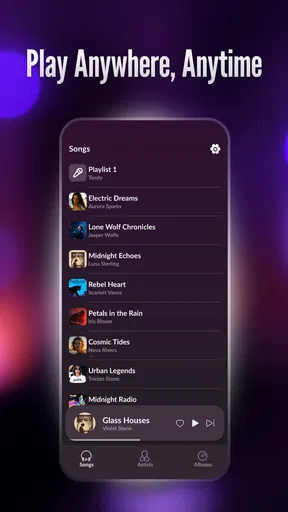
With a local music app, the initial handoff is between the phone's storage and the player. The useful result is not simply that a song exists somewhere on the device; it is that the player can present it in a way that lets me find and start it without unnecessary searching. I would give the first session a little time to locate the available audio, then inspect whether the collection appears in a sensible order.
This is also where expectations should stay realistic. Offline Player: Local Music is presented as an offline player, not as a music-management service. I would not approach it expecting it to repair missing artwork, identify unknown tracks, replace badly named files, or build a streaming-style discovery experience. Its value comes from keeping playback close to the files I supply.
For a personal collection, that directness can be refreshing. There is less distance between choosing a track and hearing it. I do not need to search an online database or wait for a connection to become stable. The trade-off is that the quality of the library view depends heavily on the quality of the files and the way they are stored.
A realistic commute workflow
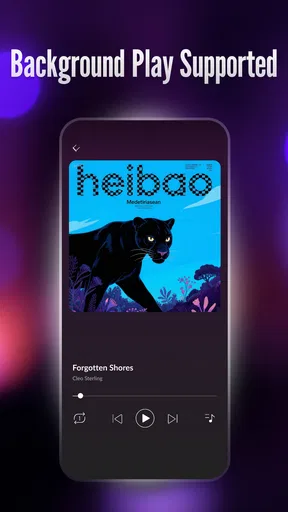
Imagine my usual morning commute begins in an area where the signal is unreliable. Before leaving home, I make sure the albums I want are stored locally. I open the player, locate the collection, choose an album, and start playback while I still have a dependable connection. After that, the journey is mainly about listening rather than maintaining a network session.
That workflow is more useful than it may sound. It removes the small uncertainties that can make streaming frustrating: a track that needs to buffer, a playlist that fails to refresh, or a service that changes what is available when I am away from a connection. The app's offline focus means the preparation happens before the trip, while the listening itself can continue in places where online music is inconvenient.
There is a hidden trade-off in that convenience. Preparation becomes my responsibility. If I forget to copy a particular album, or if the file is stored somewhere the player does not present clearly, the app cannot magically provide it. I would therefore treat the player as the final stage of a local music workflow, not as the entire workflow from discovery to ownership.
Moving between phone, files, and listening
The most important handoff is from whatever source I use to obtain or create audio to the phone's local storage. That might be a computer transfer or another legitimate method of placing files on the device. Once the files are there, the next handoff is to the player interface, where I expect to browse and start them.
Thinking in these handoffs helps explain both the app's strength and its limits. The player can be pleasantly independent once the collection is ready, but it cannot remove every bit of work before that point. If I regularly switch between devices, use several storage locations, or want one library synchronized everywhere, a cloud-based service may be a better fit. If I mainly use one phone and keep a stable collection on it, the local approach is much more practical.
I would also keep the library deliberately focused. A smaller set of albums that I actually listen to is easier to navigate than an enormous archive containing duplicates, unfinished transfers, and temporary files. This is one of the more useful ways to get better results from a simple local player: curate the phone's music storage instead of treating it as a dumping ground.
How it compares with streaming players
Compared with a typical streaming app, this player gives up breadth in exchange for independence. Streaming is better when I want to search for unfamiliar artists, follow new releases, receive recommendations, or move through a large catalog without manually managing files. It is also usually more convenient when my listening habits change every day.
Offline Player: Local Music is better when I want predictable access to a known collection. It avoids making the network the center of the listening experience, and it is a natural match for music that is personal, locally stored, or not part of a streaming catalog. I would choose it for an owned library and choose streaming when discovery matters more than control.
It also differs from a full desktop music manager. A desktop application may offer extensive tagging, conversion, synchronization, and archival tools. This app makes more sense after those tasks are finished. I see it as a lightweight listening endpoint: get the files ready elsewhere, place them on the phone, then use the app for the everyday act of playing them.
Where the simple design helps
A focused player can be easier to understand than an application filled with social feeds, recommendations, podcasts, radio stations, and account-based features. When I only want local playback, those extras can become distractions. The app's purpose is clear enough that I can judge it by a practical question: does it let me reach my stored music and listen comfortably?
The free price lowers the barrier to trying that workflow. It is also suitable for an Everyone audience, which makes the basic concept approachable for a broad range of listeners. The current version is 1.0.1, so I would keep my expectations measured and pay attention to how the app behaves with my particular file collection rather than assuming it will match a mature, feature-heavy music suite.
Its adoption gives the app some useful visibility: it has passed over a hundred thousand installs and holds a 4.4 average from around one and a half thousand ratings. Those figures suggest that the local-player idea is reaching real users, but they do not replace a personal test with my own files. Audio libraries vary widely, and a player that feels smooth with one collection may feel less convenient with another.
Small habits that improve the outcome
My first habit would be to prepare a short test group instead of transferring the entire library immediately. I would use a few tracks from different albums and check whether their names and grouping make sense in the player. This catches organization problems early and avoids turning the first session into a search through hundreds of files.
My second habit would be to keep a travel selection separate from the full archive. A compact set of albums is easier to verify before a flight or commute, and it reduces the chance that I will discover an important track is missing only after leaving home. The app is at its best when the local collection is intentional.
My third habit would be to think about the phone as the listening destination, not the backup location. I would keep important audio safely stored elsewhere and use the device copy for convenient playback. That distinction protects the collection while allowing the app to remain simple and focused.
Another useful decision is whether I want local control or automatic availability. If I frequently expect a song to appear instantly on a second phone, or I rely on playlists that change across devices, this app may add too much manual work. If I prefer deciding exactly what is on one device, the extra preparation is a reasonable exchange for offline access.
Where the flow breaks
The workflow breaks before playback when the music is not actually local. Someone expecting the app to search the internet for any song they name is likely to be disappointed. The same applies to a listener whose collection lives entirely inside a streaming account. This is not the right starting point for online discovery.
It can also break during organization. Poorly named files, duplicate tracks, and a large unstructured folder can make a local library feel harder to use than a streaming catalog. That is not necessarily a failure of the player, but it is a real source of friction that should be considered before switching.
The handoff may also be inconvenient for people who change devices often. A local library needs to be moved or recreated on the new phone, while a cloud service can usually make the same collection available after signing in. For listeners who value portability across several devices more than offline independence, the usual streaming alternative remains the better choice.
Finally, the app is not ideal if music discovery is the main reason I open a player. I would skip it when I want editorial suggestions, social sharing, live radio, or a constantly expanding catalog. Its strength is not variety; it is the calm, direct path from stored file to playback.
My recommendation after following the complete flow
After looking at the whole journey, I see Offline Player: Local Music as a practical tool for a specific kind of listener. The input is a collection already stored on the phone. The middle step is organizing and locating those files. The result is dependable local listening without needing data or Wi-Fi. That chain is simple, but it is useful when it matches the way I keep music.
I would recommend it to someone who owns or maintains a personal audio collection, travels through unreliable coverage, wants to avoid streaming interruptions, or prefers a music player without a large online ecosystem. The free cost makes experimenting easy, and the app's Music & Audio focus keeps the purpose understandable.
I would not recommend making it the only music app for someone who depends on discovery, automatic cross-device synchronization, or an online catalog. In those cases, a streaming service will save time and provide a broader experience. The choice comes down to where the listener wants the work to happen: online in the service, or locally during preparation.
My final view is that the app succeeds when simplicity is the goal. It does not try to turn a local collection into a streaming platform. Instead, it gives stored music a straightforward place to play. If I prepare the files carefully and accept the limits of a device-based library, it can be a sensible everyday companion for offline listening. If I want the app to supply the music, organize everything automatically, and keep my library synchronized everywhere, I would choose a different kind of player.
Privacy and Permissions
See what permissions an app requests and how it handles your data.
- Photos/Media/Files
- read the contents of your USB storage
- Storage
- read the contents of your USB storage
- Wi-Fi connection information
- view Wi-Fi connections
- Other
- view network connections, expand/collapse status bar, full network access, run at startup, control vibration, prevent device from sleeping, Google Play license check
Verdict
Strengths of Offline Player: Local Music
- Plays music without an internet connection
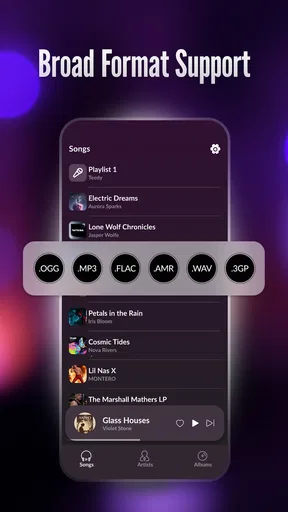
- Supports common audio formats, including MP3 and FLAC
- Keeps your music library private on your device
- Uses less mobile data and battery than streaming apps
- Offers reliable playback in areas with poor reception
Limitations of Offline Player: Local Music
- You must transfer or download songs before listening
- No built-in access to major streaming catalogs
- Album artwork and metadata may need manual organization
- Advanced equalizer features may be limited
- Music is unavailable if files are deleted or moved
Similar Picks in This Category
View All
YouTube Music
Google LLC4.4

Samsung Music
Samsung Electronics Co., Ltd.3.8

Spotify: Music and Podcasts
Spotify AB4.3

JioSaavn - Music & Podcasts
Saavn Media Limited4.3

Lark Player:Music Player & MP3
Lark Player Studio - Music, MP3 & Video Player4.6

StarMaker: Sing Karaoke Songs
SKYWORK AI PTE. LTD.4.3
Frequently Asked Questions
What is Offline Player: Local Music?
Offline Player: Local Music is an audio player designed for listening to music files already stored on your Android or iOS device. Unlike streaming services, it does not require a constant internet connection to play downloaded or transferred tracks. Its usefulness depends on the files available on your phone, so it does not automatically provide access to a large online music catalog or copyrighted songs.
Can I use Offline Player: Local Music without an internet connection?
Yes. The main purpose of Offline Player: Local Music is to let you listen to locally stored audio while offline. After adding compatible music files to the device, you can generally play them without mobile data or Wi-Fi, which is convenient during flights, commuting, travel, or in areas with weak coverage. Internet access may still be needed for downloads, updates, or certain optional features.
Which music files can I play with the app?
The supported formats may vary depending on the app version and operating system, but local players commonly work with popular audio types such as MP3, AAC, M4A, WAV, and FLAC. Before transferring a large collection, it is worth checking the current compatibility information in the app store. Files protected by digital rights management may not play even if they are stored on your device.
How do I add music to Offline Player: Local Music?
Music is usually added by importing files from your phone’s storage, the Files app, a computer transfer, or another supported file-sharing option. On some devices, you may need to grant permission to access local audio files before the library can be scanned. If a song does not appear, check its location, file format, filename, and whether the app has the required storage permissions.
Is Offline Player: Local Music free and does it contain advertisements?
The availability of free and paid features can depend on the platform, region, and current release. The basic player may be usable without a subscription, while advertisements, premium controls, or optional purchases could apply. Review the listing and in-app purchase details before downloading, especially if you want an entirely ad-free experience. Also remember that the app does not necessarily include music; you must provide your own legal files.
